Recipe Organizer
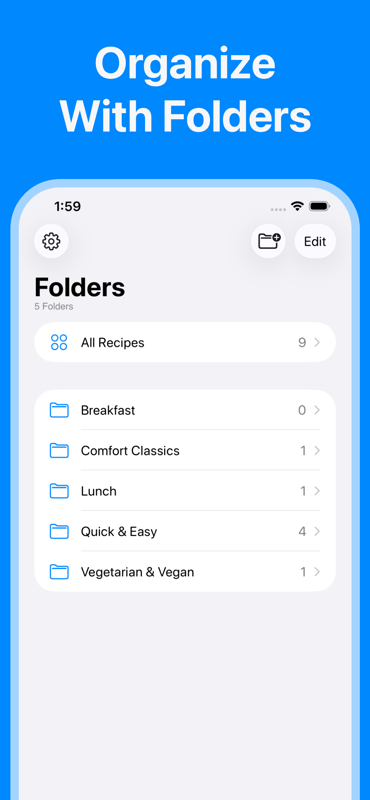
Save all your recipes in one place and organize them into custom folders — by cuisine, occasion, cooking time, or whatever works for you. Your complete digital cookbook, always with you.
Save recipes from any website, organize your digital cookbook into folders, build smart grocery lists, and sync everything across your Apple devices — all in one beautifully simple app.

Free to download · iPhone, iPad & Mac · iCloud sync included
Features
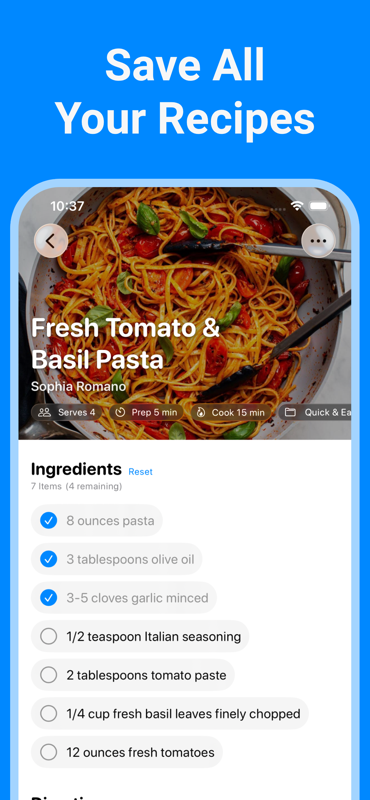
Recipes is a complete recipe management system for iPhone and iPad. It replaces your scattered bookmarks, screenshots, and sticky notes with one clean, organized home for every dish you love.
Save all your recipes in one place and organize them into custom folders — by cuisine, occasion, cooking time, or whatever works for you. Your complete digital cookbook, always with you.
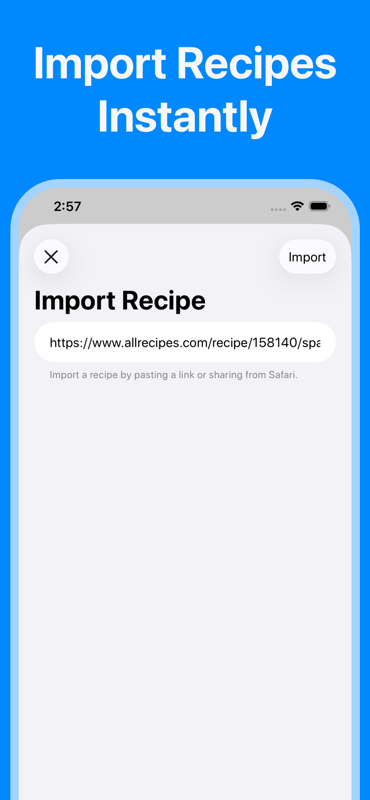
Instantly import recipes from thousands of websites with a single tap. No copying, no reformatting — the app extracts the title, ingredients, and steps automatically and saves them in a clean, ad-free format.
Turn any saved recipe into a shopping list in seconds. Add ingredients from multiple recipes at once, and the app organizes them by category so you can move through the store without backtracking.
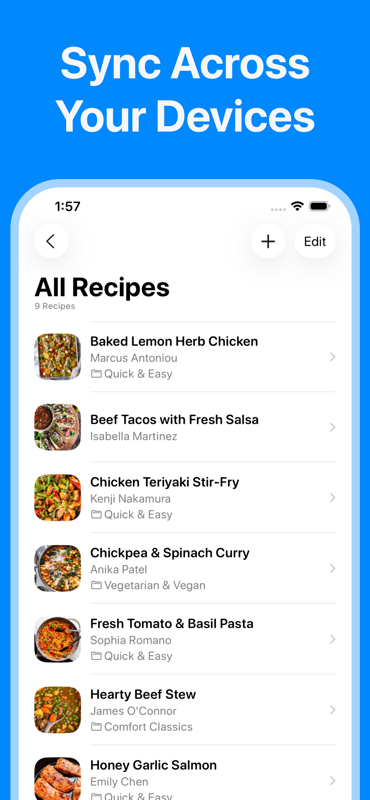
Your recipe collection syncs seamlessly across every Apple device you own — iPhone, iPad, and Mac. Add a recipe on your phone and cook from it on your iPad in the kitchen without any manual steps.
Recipes adapts to your system preferences with full Light and Dark Mode support. The clean, distraction-free design looks beautiful at any time of day and on any screen.
No account required. No personal data collected. Your recipes are stored privately in your own iCloud account and never shared with anyone. Cook with complete peace of mind.
How It Works
Getting your recipe collection under control has never been simpler. Here's how Recipes works from download to dinner.
Get Recipes free from the App Store. No account, no sign-up, no credit card — just open and start organizing.
Paste any recipe URL and the importer does the rest. Or add your own family recipes manually in seconds.
Create custom folders that match the way you cook. Keep weeknight dinners, baking projects, and holiday meals neatly separated.
Build a categorized grocery list from your recipes with one tap, then cook from clean, focused recipe pages — no ads, no distractions.
App Screenshots
A clean, modern interface built specifically for iPhone and iPad — designed to get out of your way when you're in the kitchen.
Why Recipes
Most people try to organize recipes with tools that weren't built for the job. Here's why a dedicated recipe app makes all the difference.
| Feature | Recipes | Browser Bookmarks | Notes App | |
|---|---|---|---|---|
| Organized custom folders | ✓ | ✗ | ✓ | ✓ |
| Import recipes from websites | ✓ | ✗ | ✗ | ✗ |
| Works offline | ✓ | ✗ | ✓ | ✗ |
| Smart grocery list | ✓ | ✗ | ✗ | ✗ |
| iCloud sync across devices | ✓ | ✓ | ✓ | ✓ |
| Ad-free recipe viewing | ✓ | ✗ | ✓ | ✗ |
| Zero data collected | ✓ | ✗ | ✗ | ✗ |
| Built for iPhone & iPad | ✓ | ✗ | ✓ | ✗ |
User Reviews
Finally a simple recipe organizer that feels native to iOS. I've tried at least five other apps and this one just works. Clean design, fast, and no account needed.
I replaced Notes, Pinterest, and about 40 random bookmarks with this app. Everything is organized the way I think, and importing from websites is genuinely instant.
The grocery list feature alone makes this worth it. I plan my meals for the week, add ingredients from each recipe, and show up at the store with a perfectly organized list every time.
FAQ
Everything you need to know about Recipes before you download.
About
Recipes is a free recipe organizer and digital cookbook designed specifically for iPhone and iPad. It lets you save recipes from any website on the internet, organize them into custom folders, and cook from a clean, distraction-free interface — all synced automatically across your Apple devices via iCloud. Whether you're looking for the best recipe keeper app for iPhone, a simple way to organize your family's favorite dishes, or a smarter approach to grocery shopping, Recipes was built for exactly that purpose.
Most people start organizing recipes with whatever's handy — a folder of browser bookmarks, screenshots saved to their camera roll, or a running list in the Notes app. These approaches work at first, but they break down quickly. Websites go offline. Screenshots pile up with no way to search them. Your Notes app becomes an unsearchable wall of text. A dedicated iPhone recipe app solves all of these problems at once by giving every recipe a permanent, structured, searchable home on your device.
The most effective recipe organization system is one that mirrors how you actually think about food. Recipes lets you create unlimited custom folders, so you can structure your cookbook exactly the way you want. Common approaches include organizing by meal type (Breakfast, Lunch, Dinner, Snacks), by occasion (Weeknight Dinners, Meal Prep, Holiday Baking), by cuisine (Italian, Mexican, Asian), or by cooking method (Instant Pot, Air Fryer, Grilling). You can also maintain a "Want to Try" folder for recipes you've saved but haven't cooked yet, and a "House Favorites" folder for the dishes your household requests most often.
One of Recipes's most powerful features is its recipe importer, which works with thousands of popular food and cooking websites. Instead of bookmarking a page and hoping it's still there when you need it, the importer extracts the recipe content and saves it directly to your collection in a clean, standardized format. This means no more ads, no more scrolling past lengthy blog introductions, and no more lost recipes when websites go dark. The importer works with sites like AllRecipes, Food Network, Serious Eats, NYT Cooking, Bon Appétit, The Kitchn, and thousands more.
Recipes bridges the gap between meal planning and grocery shopping in a way that standalone shopping list apps can't. Because your recipes and your grocery list live in the same app, you can add all the ingredients from a recipe to your shopping list with a single tap. Plan your meals for the week, add ingredients from each dish, and the app consolidates everything into a single categorized list — grouping produce, proteins, dairy, pantry staples, and other departments together so you move through the store efficiently without retracing your steps.
Unlike many recipe apps that require creating an account and storing your data on third-party servers, Recipes uses iCloud — Apple's secure cloud platform — for all storage and sync. This means your recipes are stored in your own iCloud account, governed by Apple's world-class privacy policies. The developer collects zero data from users, which means no analytics on what recipes you save, no behavioral tracking, and no data sold to advertisers. For privacy-conscious iPhone users, Recipes is the clear choice among recipe organizers on the App Store.
Related Topics
Join thousands of home cooks who've replaced their messy bookmarks and screenshots with one beautifully organized digital cookbook.